







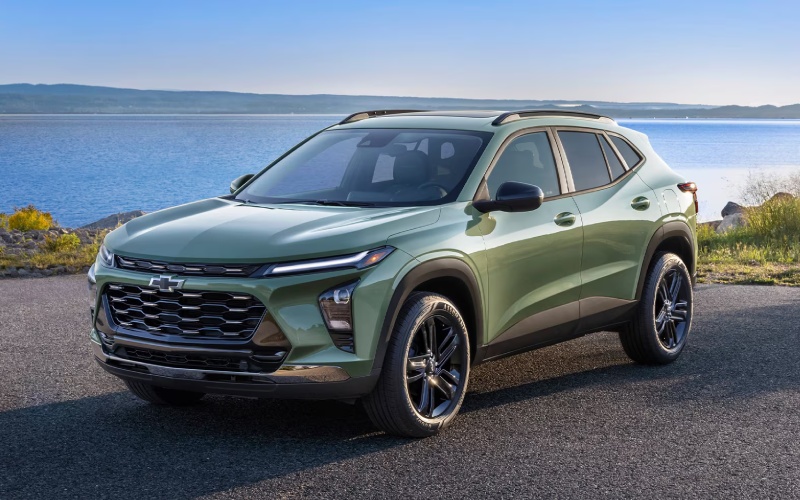
Don Johnson Auto Group – Wireless Apple CarPlay on the 2026 Chevrolet Trax — Everyday Ease around New Richmond, WI
Wireless Apple CarPlay® on the 2026 Chevrolet Trax turns quick trips and long drives around New Richmond, WI, into a natural, connected routine. No cord, no fuss—your iPhone pairs automatically, routing calls, messages, and favorite apps to the available 11-inch center HD touch-screen. Maps open with a glance, playlists follow you from home to the highway, and voice control keeps your hands focused on the wheel. The Trax balances tech with practicality—Active Noise Cancellation helps keep the cabin calm, and the 60/40 split-folding rear seat plus up to 54 cu. ft. of cargo space lets you load up sports bags, groceries, and weekend gear while staying dialed in to directions or podcasts. Add available Wireless charging and the built-in Wi-Fi® hotspot, and you have a cabin designed for modern life without clutter. For families who share driving duties, user-friendly menus, quick pairing, and the Trax’s approachable interface make every profile swap feel seamless.
What stands out most about Wireless Apple CarPlay® is how instantly useful it is in real-world traffic. Running errands on South Knowles Avenue, weaving through school pick-up, or heading out toward the St. Croix River, you can ask Siri to send or read messages, adjust navigation, or queue up playlists without looking down. The system responds naturally, and the large, landscape-oriented display presents clear icons that are easy to tap even with winter gloves. For Android households, the Trax also supports wireless Android Auto™, so everyone benefits from the same simplified routine. When weather rolls in, Apple Maps and third-party navigation apps display closures and hazards, and with the Trax’s Chevy Safety Assist features—like Lane Keep Assist with Lane Departure Warning and IntelliBeam® High Beam Assist—you benefit from a modern driving foundation to back up that real-time information.
Pairing is simple. If you are a first-time user, follow these quick steps to connect your iPhone and set the tone for every drive.
- Enable Bluetooth and Wi-Fi on your iPhone: Leave both toggles on for the fastest initial pairing.
- Start the Trax and open the infotainment menu: Look for the Apple CarPlay® connection prompt.
- Confirm pairing on both screens: Accept permissions on your iPhone and on the Trax display.
- Choose your notification and messaging options: Set what Siri can read aloud to minimize distractions.
- Customize your CarPlay® home screen: Arrange apps you use most—Maps, Music, Podcasts, and more.
Frequently Asked Questions:
Can multiple phones use Wireless Apple CarPlay® on the same Trax?
Yes. You can pair multiple devices and set a priority device. When you start the vehicle, the Trax looks for the last active phone first, then other paired phones nearby.
Does Wireless charging keep up with navigation and streaming?
Available Wireless charging helps maintain battery levels under typical use. For heavier drain—like extended GPS plus music streaming—plug-in charging remains the fastest option.
Can I run Wireless CarPlay® and still stream over Bluetooth?
CarPlay® becomes your primary interface once connected. If you prefer plain Bluetooth audio on a given trip, you can select it from the Trax audio source menu.
How do updates work for Wireless Apple CarPlay®?
Most CarPlay® enhancements arrive via iOS updates on your iPhone. Keep your device updated to benefit from new features and stability improvements.
Does the Trax require a data plan for CarPlay®?
CarPlay® uses your phone’s data plan for navigation and streaming. The Trax’s built-in Wi-Fi® hotspot is available for passengers who want their own connection.
When you are ready to see how clean and intuitive the system feels, stop by for a hands-on walkthrough. One drive is usually all it takes to understand how Wireless Apple CarPlay® transforms daily life—from neatly handling group texts during carpool to letting maps and playlists flow without wires. Don Johnson Auto Group is serving New Richmond, St. Croix Falls, and Barron with product experts who can set up your phone, customize your CarPlay® layout, and walk you through time-saving tips. If your family mixes iPhone and Android devices, we can also demonstrate wireless Android Auto™ so every driver gets the same untangled, modern experience.
Request more 2026 Chevrolet Trax information
Connect with us


- 2026 Dodge Durango
- Car Trade-in
- CDJR Dealer
- Chevrolet Colorado
- Chevrolet Dealer
- Chevrolet Equinox
- Chevrolet Silverado 1500
- Chevrolet Silverado 2500 HD
- Chevrolet Silverado 3500 HD
- Chevrolet Tahoe
- Chevrolet Trailblazer
- Chevrolet Traverse
- Chevrolet Trax
- Chrysler Pacifica
- Concierge Service
- Dodge Durango
- Ford Dealer
- Ford Escape
- Ford Escape Plug-in Hybrid
- Ford Explorer
- Ford F-150
- GMC Acadia
- GMC Sierra 1500
- GMC Sierra 2500 HD
- GMC Sierra 3500 HD
- Jeep Compass
- Jeep Wrangler
- RAM 1500
- RAM 2500
- Used Dealer