






Don Johnson Auto Group – Smarter Screens, Simpler Days — Uconnect 5 in the 2026 Dodge Durango for New Richmond, WI Drivers
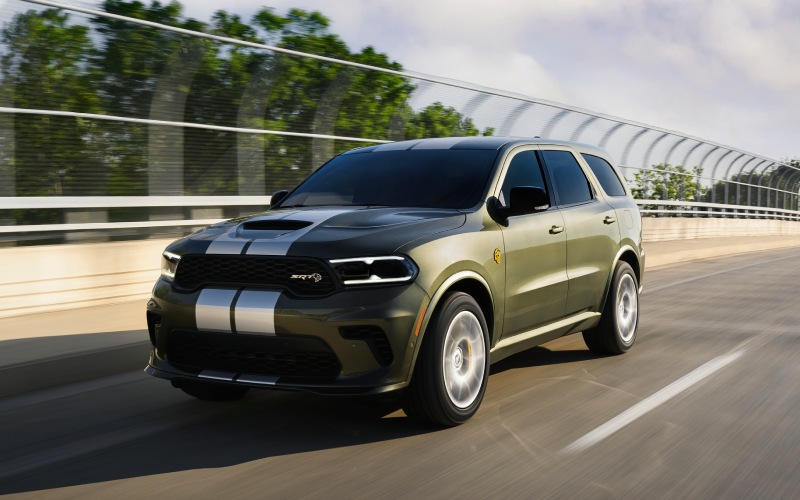
There’s a reason the 2026 Dodge Durango feels so effortless in daily life around New Richmond, WI: the Uconnect® 5 system. It brings clear visuals, fast processing, and thoughtful personalization that actually changes how you move through your day. Pair that with the Durango’s confident chassis, available HEMI® power, and tow-friendly tech, and you have a family-ready SUV that behaves like a smart assistant on wheels rather than a screen-glued distraction.
This deep dive highlights the features New Richmond drivers ask about most—wireless Apple CarPlay® and Android Auto™, multi-user profiles, integrated navigation, and how the Durango’s towing tools sync with what’s on the screen. If you split your time between county roads, WI-64, and quick freeway runs toward the Twin Cities, this is the kind of tech that smooths the edges of everyday driving.
What makes Uconnect 5 feel different?
The 10.1-inch touchscreen in the Durango doesn’t just look good; it’s laid out with a logic that makes sense when you’re on the move. Menus are shallow, the most-used tiles sit on a customizable homepage, and you can swipe between screens quickly. Pair your phone once, and you’re done—wireless Apple CarPlay® and Android Auto™ keep your podcasts, calls, and maps front and center without cable clutter. The result is fewer taps and less time eyes-off-road.
Performance aside, responsiveness matters. Uconnect® 5 loads quickly at startup and transitions cleanly between apps and native vehicle functions such as climate, camera views, or performance pages. That means you can tap into a trailer camera, adjust cabin temps, or call up turn-by-turn directions in a few intuitive moves, not a maze of menus.
Profiles: One Durango, five “just-for-you” setups
Durango lets up to five drivers create unique profiles with individual homepages and comfort settings. If your household includes a daily commuter, an occasional tower, and a weekend errand runner, each can set their favorites, recent destinations, preferred media, and available seat/steering-wheel warmth just the way they like it. Hand over the keys and your setup stays saved; no one’s “fixing” your screen for you anymore.
Another advantage—feature familiarity. Once your homepage is tailored to your habits, you rarely need to hunt for functions. Your trailer brake screen can live right next to navigation. Your top three playlists can sit beside your most-used phone contacts. It shapes the Durango into a one-tap SUV.
Wireless integration that actually stays out of the way
In theory, wireless phone connections are great; in practice, some are finicky. Durango’s wireless Apple CarPlay® and Android Auto™ are consistently stable. That matters when you’re navigating from New Richmond to Somerset on the fly or fielding a call as you pass the roundabouts on Paperjack Drive. Combine that with available wireless charging, multiple USB Type A-C ports, and a 115-volt outlet, and everyone on board can keep devices powered without cable chaos.
If your day leans more analog—no problem. Uconnect® 5 still serves up native navigation, media, and vehicle settings without relying on your phone. Think of it as choice, not compromise.
Towing tech that plays well with your screen
New Richmond families who tow appreciate how naturally Durango’s tech supports the task. Available Blind Spot Monitoring with Trailer Tow Detection extends awareness along the length of your trailer, showing alerts where you’re most likely to look. Trailer Sway Control works in the background to stabilize your rig with brake and throttle inputs, and integrated trailer brake control (available in tow packages) can be monitored via the central screen to dial in stopping force.
When equipped with the Tow ’n Go Package on HEMI® V8 models, you get configurable drive modes—including Tow—alongside performance suspension and wheel/tire upgrades. It’s not just about numbers. It’s tech meeting tuning, so your screen and chassis are on the same page when you’re merging onto WI-64 with a camper in tow.
Practical setup tips for New Richmond, WI drives
- Build your homepage: Place Navigation, Phone, Audio, and Trailer controls on a single screen.
- Name your profiles: Use clear labels like “Daily,” “Tow,” or “Weekend” so anyone can pick the right setup fast.
- Favorite your routes: Save frequent destinations such as school, sports fields, or a go-to launch on the Apple River.
- Use voice first: For calls, destinations, and media changes, voice prompts keep eyes and hands where they belong.
- Check trailer settings: If equipped, confirm trailer brake gain and Tow drive mode before you roll.
Those small tweaks remove friction from everyday driving—especially on busy stretches like Knowles Avenue or heading west toward I-94. The goal is to let the Durango serve up what you need, when you need it, with minimal fiddling.
Audio lovers can go further with the available Harman Kardon® 19-speaker system. It’s more than volume; imaging and clarity make podcasts and playlists feel crisp even at lower levels. Paired with Uconnect® 5’s quick access to your favorite sources, the cabin becomes a comfortable, consistent space whether you’re solo or carpooling the team.
Frequently Asked Questions:
Can I use both Apple CarPlay® and Bluetooth at the same time?
Yes. Wireless Apple CarPlay® handles maps and media, while Bluetooth maintains a steady hands-free phone connection. It feels seamless in day-to-day driving.
How many user profiles can I create in Uconnect® 5?
Up to five. Each profile stores custom homepages and preferences so different drivers can jump in and feel at home instantly.
Is the trailer brake controller visible on the main screen?
If equipped, yes. You can monitor and adjust trailer brake gain through the touchscreen so settings are easy to access before a tow.
Will Uconnect® 5 still work if my phone battery dies?
Absolutely. Native navigation, audio, and vehicle controls remain available. If you have the wireless charge pad, drop your phone on it and keep moving.
Does voice control work with third-party apps?
When using Apple CarPlay® or Android Auto™, voice assistants can access supported apps for directions, calls, and media requests.
Uconnect® 5 may be the Durango’s most underrated strength. It’s the way the SUV becomes an extension of your routine—from school runs and quick errands to towing gear for a weekend away. At Don Johnson Auto Group, we can help you set up profiles, tailor your homepages, and connect your phone so the system feels like second nature on day one.
If you are mapping out your next family SUV, keep “screen experience” high on your checklist. The Durango’s combination of responsive tech, meaningful towing integrations, and cabin utility makes it a smart fit for New Richmond, WI drivers who value calm, capable commuting with the flexibility to do more. We are proudly serving Chippewa Falls, New Richmond, and St. Croix Falls with hands-on demos and time-saving shopping tools to help you decide which configuration fits best.
Request more 2026 Dodge Durango information
Connect with us


- 2026 Dodge Durango
- Car Trade-in
- CDJR Dealer
- Chevrolet Colorado
- Chevrolet Dealer
- Chevrolet Equinox
- Chevrolet Silverado 1500
- Chevrolet Silverado 2500 HD
- Chevrolet Silverado 3500 HD
- Chevrolet Tahoe
- Chevrolet Trailblazer
- Chevrolet Traverse
- Chevrolet Trax
- Chrysler Pacifica
- Concierge Service
- Dodge Durango
- Ford Dealer
- Ford Escape
- Ford Escape Plug-in Hybrid
- Ford Explorer
- Ford F-150
- GMC Acadia
- GMC Sierra 1500
- GMC Sierra 2500 HD
- GMC Sierra 3500 HD
- Jeep Compass
- Jeep Wrangler
- RAM 1500
- RAM 2500
- Used Dealer